 POSENTRYX
One click. The right lot size.
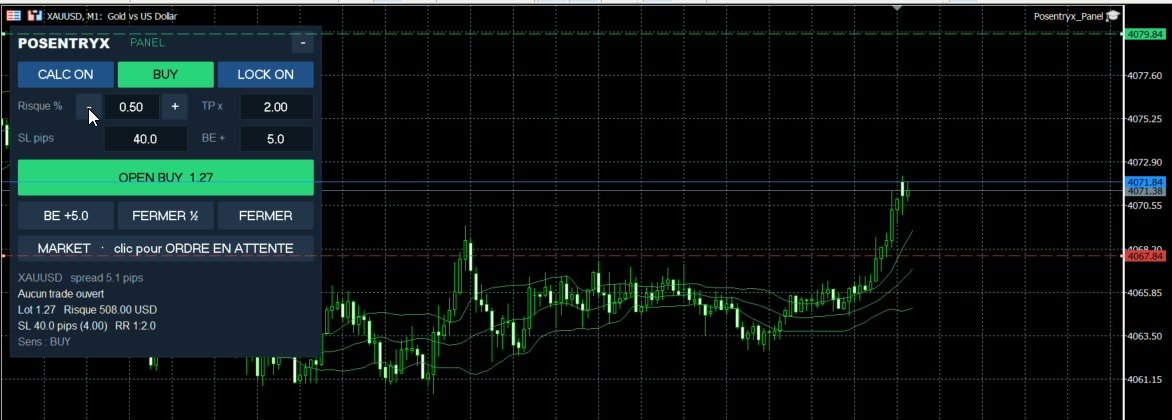
Choose how much you are willing to lose, place your stop on the chart: the panel calculates the exact lot size and opens the trade with the SL and the TP.
€49 · one-time purchase · perpetual license · MT4 or MT5
Everything it does
At market or at your price
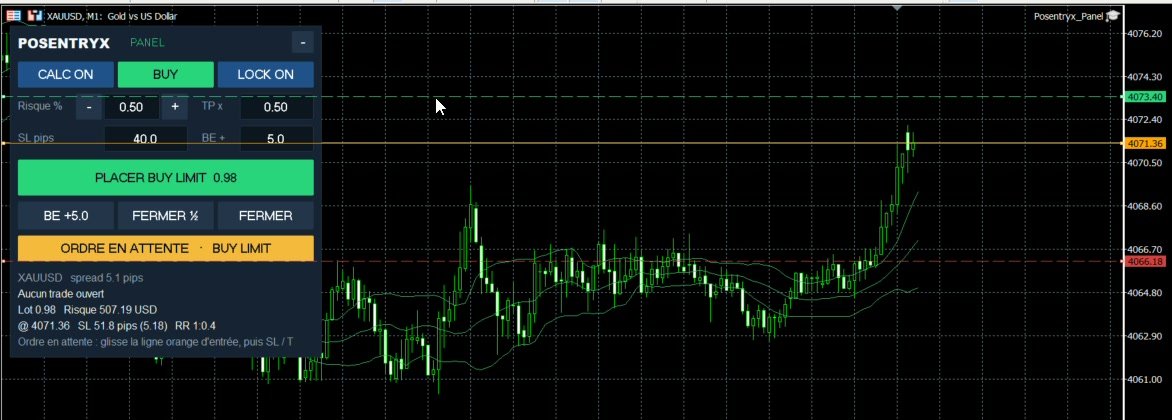
One click on “MARKET · click for PENDING”: the entry line turns orange. Drag it where you want to enter, and OPEN becomes PLACE.
- Above the price: BUY STOP or SELL LIMIT
- Below the price: BUY LIMIT or SELL STOP
- The lot size is calculated on the entry → SL distance
- CLOSE also removes pending orders
Never an oversized lot
If the calculated lot size is below your broker's minimum, the button shows LOT TOO SMALL and nothing is sent: your risk is never exceeded. A maximum risk per trade blocks typing mistakes.
- Broker minimum, maximum and step volumes respected
- Free margin checked before sending
- Minimum distances (stop levels and freeze levels) respected
- ECN brokers: SL and TP set right after execution
Set it once and forget it
Default risk, button step, maximum risk, calculation on balance or equity, SL unit, TP, break-even, magic number, panel position: everything is set in the EA's inputs.
- Manages all trades of the symbol, or only the ones opened from the panel
- Works with Posentryx Guard: OPEN is refused once your daily limit is reached
What you need
- MetaTrader 4 or MetaTrader 5 on Windows (PC or VPS)
- Any broker, hedging and netting accounts
- Installed in 2 minutes: one file to drop on the chart
Posentryx is an execution and risk management tool. It provides no signals and no investment advice, and it guarantees no results. Trading CFDs and forex carries a high risk of loss, and leverage can magnify it.