 POSENTRYX
Your trades, sized to your risk.
You choose your risk in %, Posentryx calculates the lot size. Open, move to break-even and close your positions in one click, on your PC or from your phone.
The panel, button by button
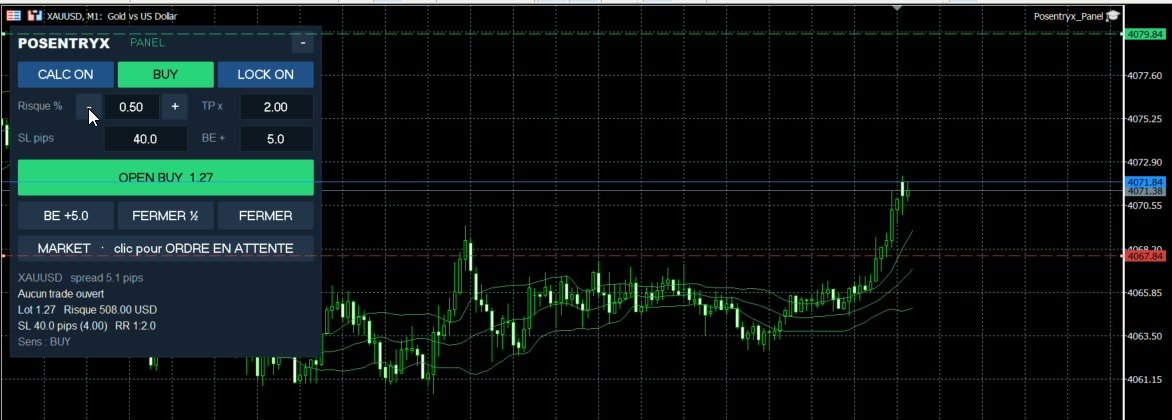
Try it: flip the direction, change the risk, the stop or the TP, drag the lines on the chart, switch to a pending order. The lot size is recalculated every time, just like in your MetaTrader.
One click, the right lot size
You set your risk and your stop: the panel calculates the exact lot size and sends the order with the SL and the TP. No more calculator, no more guessing the lot size.
Click the buttons, change the values: this is a simulation, no real order is sent.
Simulation on XAUUSD: 1 pip = $0.10, which is $10 per pip for 1 lot. Actual values depend on your broker.
Three tools, one logic: risk first.
Each tool works on its own. Together, they cover your trading at your desk, on the move and against prop firm rules.
The trading panel
Lot size based on your risk, SL and TP lines you drag on the chart, LOCK, break-even, half and full close, pending orders. Right inside MetaTrader.
Your account's safeguard
Watches your daily loss and your drawdown. It alerts you, then closes everything before you break your challenge rules. Your own risk limit, every day.
Your MetaTrader in your pocket
Live chart, SL and TP lines you drag with your finger, OPEN, BE, CLOSE: your orders go to your MT4 or MT5, with the same lot size calculation as on PC.
Traders who stay in the game manage their risk
Consistent risk
The same risk in % on every trade, whatever the stop distance. No more oversized lots after a losing streak.
Less emotion
The math is done before the order is sent. You decide where to put your stop, the panel handles the rest.
Faster
One click instead of ten: open, secure, take half off, close everything. Optional keyboard shortcuts.
Broker rules respected
Minimum and maximum volumes, free margin, minimum stop distances: everything is checked before the order goes out.
Plan. Protect. Control.
Prepare your trade
Choose your risk, drag your stop and your target on the chart. The lot size, the amount at risk and the ratio are shown before you send.
Stay in control
Break-even in one click, partial close, and Guard watching your daily loss so you don't blow your challenge.
From anywhere
Follow and manage your positions from your phone with Mobile: your PC executes, you stay in charge.
Right inside your MetaTrader
An expert advisor you drop on the chart. It makes no decisions for you: it executes your clicks with the right lot size and protects your positions.
- Risk in % of balance or equity
- SL in pips, points or price
- Settings remembered for each symbol
- Hedging and netting accounts, ECN brokers, FIFO rule
Choose your plan
Posentryx Mobile as a monthly or yearly subscription (2 months free), no commitment. Panel and Guard as a one-time purchase, perpetual license, no subscription.
Mobile Essential
- OPEN, BE, CLOSE, risk in %
- Candlestick chart
- 10 basic indicators
- 3 trading profiles
Mobile Pro
- Everything in Essential
- Renko and Heikin Ashi
- 61 indicators
- Unlimited profiles
- Posentryx Panel included
Mobile Pro+
- Everything in Pro
- Up to 3 accounts
- Posentryx Guard included
- Priority support
Prices include tax. VAT is calculated according to your country at checkout. 14-day money-back guarantee if the software does not work on your setup (Terms of sale). Panel, Guard and Mobile run on a Windows PC (or Windows VPS) with MetaTrader 4 or 5 open.
Frequently asked questions
Does it work on Mac?
Posentryx is built and tested for MetaTrader 4 and 5 on Windows, on a Windows PC or VPS. The MetaTrader apps for Android and iPhone do not accept expert advisors. To trade from your phone, Posentryx Mobile controls the MetaTrader running on your PC.
Does my computer have to stay on to use Mobile?
Yes. Posentryx Mobile controls the MetaTrader installed on your PC (or on a VPS). The PC and MetaTrader must stay open while you trade from your phone.
Is it compatible with FTMO and other prop firms?
Posentryx places manual orders on your own terminal, as if you were clicking yourself. Guard helps you stay within your challenge's loss limits. Always check your prop firm's rules on permitted tools.
Which markets can I trade?
All the symbols offered by your broker: forex, gold, indices, crypto. The calculation uses the tick value provided by your broker.
What happens if the calculated lot size is too small?
If the calculated lot size is below your broker's minimum, nothing is sent: your risk is never exceeded. An option lets you allow the minimum lot size if you prefer.
Can I cancel my Mobile subscription?
Yes, at any time. Your access stays active until the end of the period you have paid for.
Does Posentryx give me signals?
No. Posentryx is an execution and risk management tool: you decide your own entries. It does not provide investment advice. Trading CFDs and forex carries a high risk of loss.
One click. The right lot size. Risk first.
Join the first Posentryx users: choose your plan, and your license key and files arrive by email.